
Var FiveM
ScriptsBundlesSubscriptionsDocs
VAR
Var FiveM
ScriptsBundlesSubscriptionsDocs
Theme CustomizerAboutContact
Shop Now

-- 28 sections

  • ›paintball
    • configuration
    • features
    • anti-cheat-integration
    • game-modes
    • api
    • arenas
    • command
    • config
  • ›chess
    • configuration
    • events
    • integration-example
    • exports
    • controls
    • config
  • ›supermarket simulator
    • configuration
    • catalog-manager
    • commands-and-permissions
    • props-editors
    • owning-and-running-a-store
    • config
  • ›coins shop
    • configuration
    • identifier
    • export
    • server-event
    • languages
    • products
    • delivery
    • owner-panel
    • webhooks-discord
  • ›clothes shop
    • installation
    • configuration
    • blips-marker
    • translate
    • change-cam-and-pos
  • ›casino
    • installation
    • configuration
    • main-config
    • horse
    • lucky-whell
    • translate
  • ›drugs
    • installation
    • configuration
    • labs-and-interiors
    • maintenance-and-modules
    • missions
    • street-selling
    • administration
  • ›clothes shop v2
    • installation
    • configuration
    • position
    • advice-and-troubleshooting
    • configure-clothing-shops
  • ›interaction
    • configuration
    • public-api
    • interaction-config-reference
    • dialog-system
  • ›emote
    • configuration
    • config
    • adding-emote
    • menu
    • keybind
    • modules
    • 3d-placement
    • playlist
    • wheel
    • shared-emotes
  • ›crew
    • installation
    • export
  • ›alert job
    • installation
    • server-export
  • ›pin code
    • installation
    • export
  • ›society manager
    • installation
    • export
    • configuration
    • translate
    • max-salary
    • last-invoice
  • ›property
    • installation
    • configuration
    • translate
    • add-interior
  • ›barber shop
    • installation
    • configuration
    • change-menu-open-source
    • blips
    • translate
    • add-shop
  • ›shop with basket
    • installation
    • configuration
    • item-category-config
    • blips-marker
    • translate
    • add-shop
  • ›tattoo shop
    • installation
    • configuration
    • edit-tattoo
    • blips-marker
    • translate
    • add-shop
  • ›gardener job
    • installation
    • configuration
    • change-pos-farm
    • blips
    • translate
  • ›heist atm
    • installation
    • configuration
    • event-money
    • translate
    • police-alert
  • ›heist fleeca
    • installation
    • configuration
    • translate
    • pos-fleeca-heist
  • ›poster job
    • installation
    • configuration
    • change-pos-farm
    • change-poster-texture
    • blips-marker
    • translate
  • ›loading screen
    • installation
    • configuration
  • ›bank
    • installation
    • configuration
    • position
    • blips
    • translate
    • society
  • ›autocardealer
    • installation
    • configuration
    • add-vehicles
    • translate
    • blips
    • coords
  • ›character creator
    • installation
    • configuration
    • translate
    • expression
    • spawn
  • ›multi character
    • installation
    • configuration
    • translate
    • change-character-creator
    • commands
  • ›bill
    • installation
    • configuration
    • translate
    • control

~/docs/poster-job/configuration/change-poster-texture

poster job docs›
  • installation
  • configuration
  • configuration/change-pos-farm
  • configuration/change-poster-texture
  • configuration/blips-marker
  • configuration/translate

Poster Job

Change Poster Texture

-- 1 min read

get var-posterjobtry it on the test server

To change the texture on a poster for example if you want instead of that of GTAV to put posters for your RP server for example the poster of a job, you will need some prerequisites.

  • OpenIV

Once your OpenIV is installed you will have to search in the search bar for "ba_prop_battle_poster_skin_01".
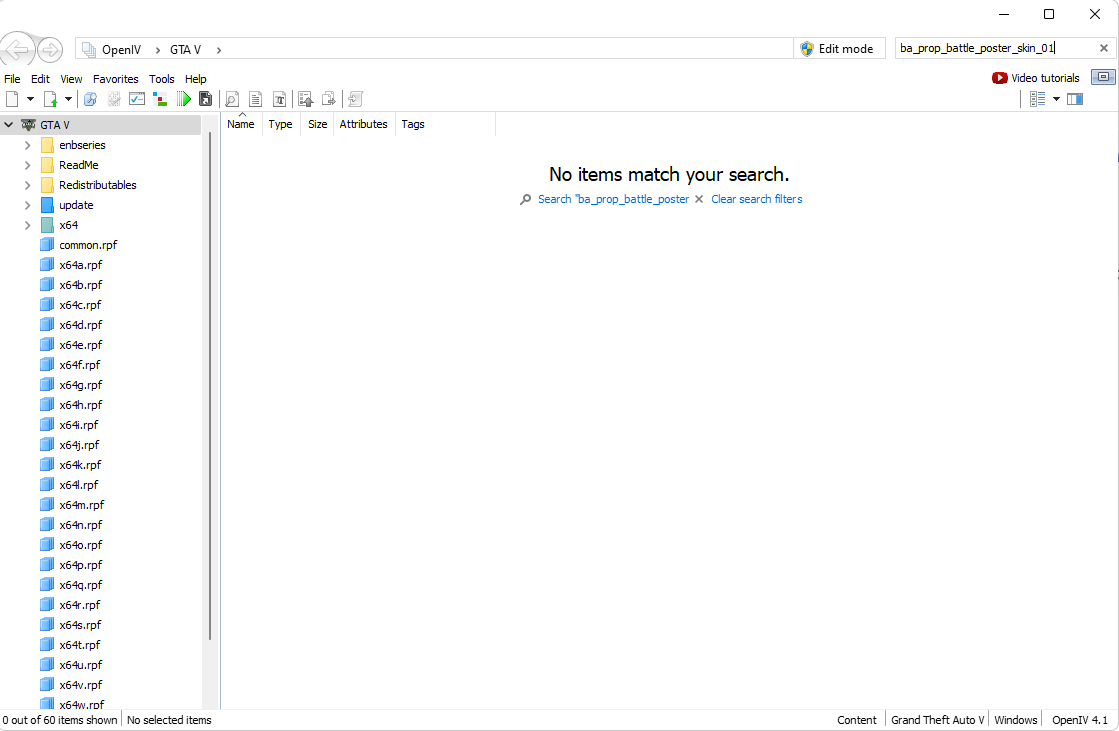
If no results are found, this is normal, you must press the link "Search ba_prop_battle_poster_skin_01".

Once the result is found, double-click on it and go to the bottom of the folder and click on the Edit mode button.

Set this aside and open an image editor such as Photoshop and create a file with the same dimensions as the texture so 512x256.

Return to the YTD file and right-click on the file you want to replace and click on Export.

Once this is done saving the file as PNG, and open it in Photoshop. Make the changes you want on X post and then save the file.

Then return to the YTD file and click on the texture that you had exported and click on replace and select your image and save the YTD file.

!important

The file must have the same name as the one being exported

Once finished, create a stream folder in the Var-GardenerJob folder called stream and drag the YTD texture that you changed.

Restart your server and enjoy !

inote

If you have any problem ask for help on our Discord or even if you want to go further as added more posts

previouschange-pos-farmnextblips-marker
VAR
Var FiveM

Premium FiveM scripts. Low resmon, high quality. Built for ESX, QBCore & Standalone.

28scripts
1,500+sales

Scripts

  • Marketplace
  • Bundles
  • Subscriptions
  • Theme Customizer

Most Popular

  • Supermarket Simulator
  • FiveM Casino Script
  • FiveM Coin Shop
  • FiveM Emote Menu
  • FiveM Paintball Script

Resources

  • Guides
  • Documentation
  • Support

Company

  • About
  • Contact
  • Discord

Legal

  • Terms
  • Privacy
  • Refunds

© 2026 Var FiveM. All sales final.

Payments byTebex