
Var FiveM
ScriptPacchettiAbbonamentiDocs
VAR
Var FiveM
ScriptPacchettiAbbonamentiDocs
Personalizza temaChi siamoContatti
Acquista ora

-- 28 sections

  • ›paintball
    • configuration
    • features
    • anti-cheat-integration
    • game-modes
    • api
    • arenas
    • command
    • config
  • ›chess
    • configuration
    • events
    • integration-example
    • exports
    • controls
    • config
  • ›supermarket simulator
    • configuration
    • catalog-manager
    • commands-and-permissions
    • props-editors
    • owning-and-running-a-store
    • config
  • ›coins shop
    • configuration
    • identifier
    • export
    • server-event
    • languages
    • products
    • delivery
    • owner-panel
    • webhooks-discord
  • ›clothes shop
    • installation
    • configuration
    • blips-marker
    • translate
    • change-cam-and-pos
  • ›casino
    • installation
    • configuration
    • main-config
    • horse
    • lucky-whell
    • translate
  • ›drugs
    • installation
    • configuration
    • labs-and-interiors
    • maintenance-and-modules
    • missions
    • street-selling
    • administration
  • ›clothes shop v2
    • installation
    • configuration
    • position
    • advice-and-troubleshooting
    • configure-clothing-shops
  • ›interaction
    • configuration
    • public-api
    • interaction-config-reference
    • dialog-system
  • ›emote
    • configuration
    • config
    • adding-emote
    • menu
    • keybind
    • modules
    • 3d-placement
    • playlist
    • wheel
    • shared-emotes
  • ›crew
    • installation
    • export
  • ›alert job
    • installation
    • server-export
  • ›pin code
    • installation
    • export
  • ›society manager
    • installation
    • export
    • configuration
    • translate
    • max-salary
    • last-invoice
  • ›property
    • installation
    • configuration
    • translate
    • add-interior
  • ›barber shop
    • installation
    • configuration
    • change-menu-open-source
    • blips
    • translate
    • add-shop
  • ›shop with basket
    • installation
    • configuration
    • item-category-config
    • blips-marker
    • translate
    • add-shop
  • ›tattoo shop
    • installation
    • configuration
    • edit-tattoo
    • blips-marker
    • translate
    • add-shop
  • ›gardener job
    • installation
    • configuration
    • change-pos-farm
    • blips
    • translate
  • ›heist atm
    • installation
    • configuration
    • event-money
    • translate
    • police-alert
  • ›heist fleeca
    • installation
    • configuration
    • translate
    • pos-fleeca-heist
  • ›poster job
    • installation
    • configuration
    • change-pos-farm
    • change-poster-texture
    • blips-marker
    • translate
  • ›loading screen
    • installation
    • configuration
  • ›bank
    • installation
    • configuration
    • position
    • blips
    • translate
    • society
  • ›autocardealer
    • installation
    • configuration
    • add-vehicles
    • translate
    • blips
    • coords
  • ›character creator
    • installation
    • configuration
    • translate
    • expression
    • spawn
  • ›multi character
    • installation
    • configuration
    • translate
    • change-character-creator
    • commands
  • ›bill
    • installation
    • configuration
    • translate
    • control

~/docs/casino/installation

casino docs›
  • installation
  • configuration
  • configuration/main-config
  • configuration/horse
  • configuration/lucky-whell
  • configuration/translate

Casino

Installation

-- 4 steps · 3 code blocks · 1 min read

get var-casinotry it on the test server
inote

Installing this resource is like any other resource only verified that you have the required dependencies

01step

Connect via this site: https://keymaster.fivem.net/ with your CFX account to which your purchase was made on the store https://www.var-fivem.com/

02step
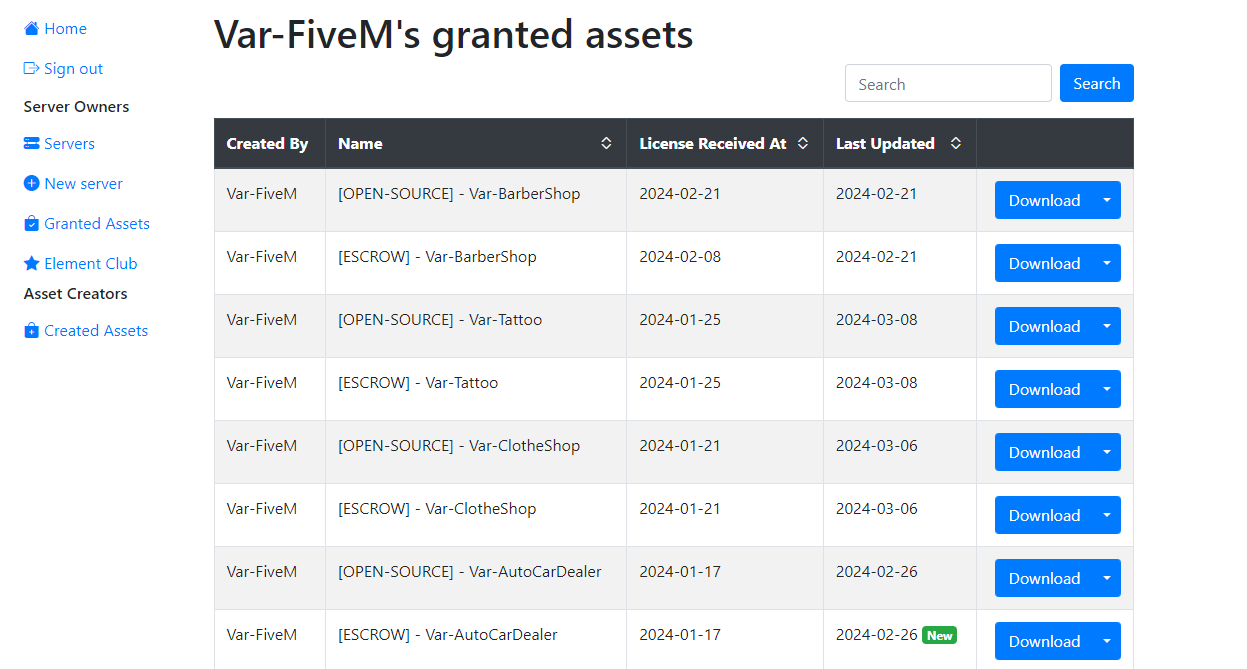
Go to the Granted Assets category and download the most recent version of the Casino

03Don't forget to add the SQL depending on the framework you are using on your server

04step

Once the download is complete, unzip the file and drag it into the resources folder of your server

inote

If you use the FiveM IPL, remember to delete the function.lua file at the root of the project, however, if you use, for example, MOLO MODDING mapping, leave it.

If you use another mapping change the coordinates in function.lua. Your casino mappings probably use custom props so remember to put the right values ​​in the function.lua file

For example :

lua
CreateModelSwap(920.291, 15.625, 74.887, 1.0, -1650151675, GetHashKey("vw_prop_casino_blckjack_01b"), 0)
  • 920.291, 15.625, 74.887 - Coordinates of the props of the mapping
  • 1.0 - Radius to swap the props
  • -1650151675 - Original Model so from the mapping !
  • New model so leave GetHashKey("vw_prop_casino_blckjack_01b") (For the blackjack table)
!important

The roulette game is the only one that spawns the props directly so you just need to get the props hashkey and put it in Shared.RouletteToDelete in the roulette config file to delete the props

!warning

If you added the resource while your server was already running, remember to do the refresh command and then ensure the resource

powershell
refresh
code
ensure Var-Casino
nextconfiguration

-- on this page

  1. 01step
  2. 02step
  3. 03don't forget to add the sql depending on the framework you are using on your server
  4. 04step
VAR
Var FiveM

Script FiveM premium. Low resmon, alta qualita. Per ESX, QBCore & Standalone.

28script
1,500+vendite

Script

  • Marketplace
  • Pacchetti
  • Abbonamenti
  • Personalizza tema

Piu popolari

  • Supermarket Simulator
  • FiveM Casino Script
  • FiveM Coin Shop
  • FiveM Emote Menu
  • FiveM Paintball Script

Risorse

  • Free Scripts
  • Guides
  • Documentazione
  • Supporto

Azienda

  • Chi siamo
  • Contatti
  • Discord

Legale

  • Termini
  • Privacy
  • Rimborsi

© 2026 Var FiveM. Tutte le vendite sono definitive.

Pagamenti tramiteTebex