
Var FiveM
ScriptsPacksAbonnementsDocs
VAR
Var FiveM
ScriptsPacksAbonnementsDocs
Personnaliser le themeA proposContact
Acheter

-- 28 sections

  • ›paintball
    • configuration
    • features
    • anti-cheat-integration
    • game-modes
    • api
    • arenas
    • command
    • config
  • ›chess
    • configuration
    • events
    • integration-example
    • exports
    • controls
    • config
  • ›supermarket simulator
    • configuration
    • catalog-manager
    • commands-and-permissions
    • props-editors
    • owning-and-running-a-store
    • config
  • ›coins shop
    • configuration
    • identifier
    • export
    • server-event
    • languages
    • products
    • delivery
    • owner-panel
    • webhooks-discord
  • ›clothes shop
    • installation
    • configuration
    • blips-marker
    • translate
    • change-cam-and-pos
  • ›casino
    • installation
    • configuration
    • main-config
    • horse
    • lucky-whell
    • translate
  • ›drugs
    • installation
    • configuration
    • labs-and-interiors
    • maintenance-and-modules
    • missions
    • street-selling
    • administration
  • ›clothes shop v2
    • installation
    • configuration
    • position
    • advice-and-troubleshooting
    • configure-clothing-shops
  • ›interaction
    • configuration
    • public-api
    • interaction-config-reference
    • dialog-system
  • ›emote
    • configuration
    • config
    • adding-emote
    • menu
    • keybind
    • modules
    • 3d-placement
    • playlist
    • wheel
    • shared-emotes
  • ›crew
    • installation
    • export
  • ›alert job
    • installation
    • server-export
  • ›pin code
    • installation
    • export
  • ›society manager
    • installation
    • export
    • configuration
    • translate
    • max-salary
    • last-invoice
  • ›property
    • installation
    • configuration
    • translate
    • add-interior
  • ›barber shop
    • installation
    • configuration
    • change-menu-open-source
    • blips
    • translate
    • add-shop
  • ›shop with basket
    • installation
    • configuration
    • item-category-config
    • blips-marker
    • translate
    • add-shop
  • ›tattoo shop
    • installation
    • configuration
    • edit-tattoo
    • blips-marker
    • translate
    • add-shop
  • ›gardener job
    • installation
    • configuration
    • change-pos-farm
    • blips
    • translate
  • ›heist atm
    • installation
    • configuration
    • event-money
    • translate
    • police-alert
  • ›heist fleeca
    • installation
    • configuration
    • translate
    • pos-fleeca-heist
  • ›poster job
    • installation
    • configuration
    • change-pos-farm
    • change-poster-texture
    • blips-marker
    • translate
  • ›loading screen
    • installation
    • configuration
  • ›bank
    • installation
    • configuration
    • position
    • blips
    • translate
    • society
  • ›autocardealer
    • installation
    • configuration
    • add-vehicles
    • translate
    • blips
    • coords
  • ›character creator
    • installation
    • configuration
    • translate
    • expression
    • spawn
  • ›multi character
    • installation
    • configuration
    • translate
    • change-character-creator
    • commands
  • ›bill
    • installation
    • configuration
    • translate
    • control

~/docs/emote/configuration

emote docs›
  • configuration
  • configuration/config
  • configuration/adding-emote
  • configuration/menu
  • configuration/keybind
  • configuration/modules
  • configuration/3d-placement
  • configuration/playlist
  • configuration/wheel
  • configuration/shared-emotes

Emote

Configuration

-- 4 steps · 2 code blocks · 1 min read

get var-emotetry it on the test server
inote

Installing this resource is like any other resource only verified that you have the required dependencies

01step

Connect via this site: https://keymaster.fivem.net/ with your CFX account to which your purchase was made on the store https://www.var-fivem.com/

02step
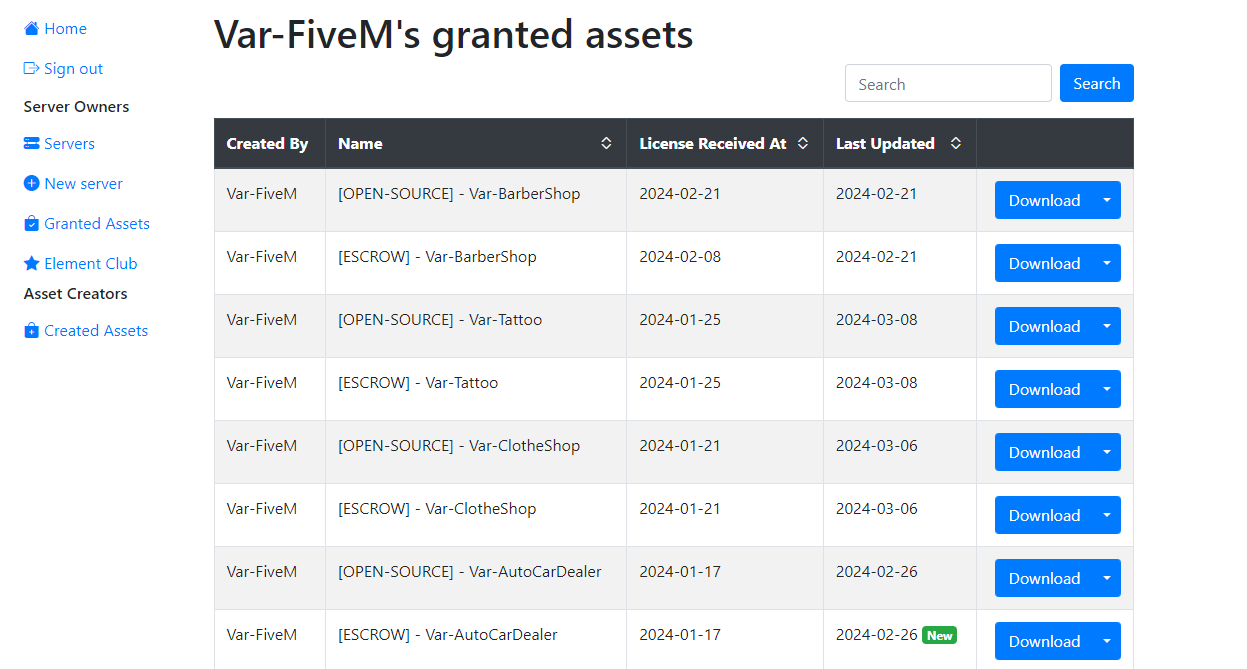
Go to the Granted Assets category and download the most recent version of the Casino

03step

Once the download is complete, unzip the file and drag it into the resources folder of your server

powershell
refresh
code
ensure Var-Emote

04(Optional)

If you are having trouble getting the 3D emote to work with the base object_gizmo resource here is our slightly modified version

Download object_gizmo.zip

nextconfig

-- on this page

  1. 01step
  2. 02step
  3. 03step
  4. 04(optional)
VAR
Var FiveM

Scripts FiveM premium. Low resmon, haute qualite. Pour ESX, QBCore & Standalone.

28scripts
1,500+ventes

Scripts

  • Marketplace
  • Packs
  • Abonnements
  • Personnaliser le theme

Plus populaires

  • Supermarket Simulator
  • FiveM Casino Script
  • FiveM Coin Shop
  • FiveM Emote Menu
  • FiveM Paintball Script

Ressources

  • Free Scripts
  • Guides
  • Documentation
  • Support

Entreprise

  • A propos
  • Contact
  • Discord

Legal

  • CGV
  • Confidentialite
  • Remboursements

© 2026 Var FiveM. Toutes les ventes sont definitives.

Paiements parTebex