
~/docs/character-creator/installation
character creator docs›
Character Creator
Installation
-- 8 code blocks · 1 min read
1. Log in to your keymaster account
Connect via this site: https://keymaster.fivem.net/ with your CFX account to which your purchase was made on the store https://www.var-fivem.com/
2. Download resource
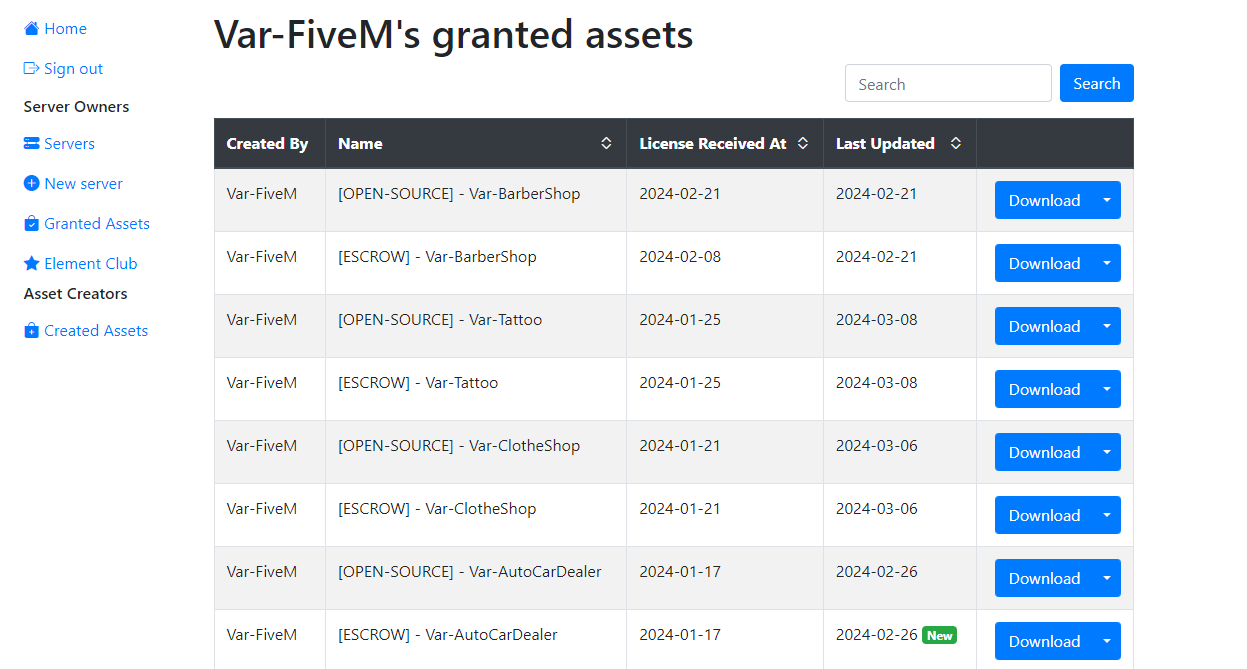
Go to the Granted Assets category and download the most recent version of the Creator
3. Edit the scripts to align with the standard core resources
ESX
@esx_skin
If you not using multicharacter and using esx_skin you need change this
- Open @esx_skin/client/main.lua
- Replace
TriggerEvent("skinchanger:loadSkin", { sex = 0 }, OpenSaveableMenu)withTriggerEvent('Creator:Init')
@esx_identity
- Perform the same modification in @esx_identity/server/main.lua
- Locate the lines
TriggerClientEvent("esx_identity:showRegisterIdentity", xPlayer.source)and replace it withTriggerClientEvent('Creator:Init', xPlayer.source)
@esx_multicharacter
If you using multicharacter you need to change only this
- Open @esx_multicharacter/client/main.lua
- Search
esx:playerLoadedevent and replace it with the code below - Search all trigger
TriggerEvent("esx_identity:showRegisterIdentity") - Replace it by
TriggerEvent("Creator:Init")
RegisterNetEvent('esx:playerLoaded')
AddEventHandler('esx:playerLoaded', function(playerData, isNew, skin)
	local spawn = playerData.coords or Config.Spawn
	if isNew or not skin or #skin == 1 then
		skin = Config.Default[playerData.sex]
		skin.sex = playerData.sex == "m" and 0 or 1
		local model = skin.sex == 0 and mp_m_freemode_01 or mp_f_freemode_01
		RequestModel(model)
		while not HasModelLoaded(model) do
			RequestModel(model)
			Wait(0)
		end
		SetPlayerModel(PlayerId(), model)
		ResetEntityAlpha(PlayerPedId())
		SetModelAsNoLongerNeeded(model)
		TriggerEvent('skinchanger:loadSkin', skin, function()
			ResetEntityAlpha(PlayerPedId())
			SetPedAoBlobRendering(PlayerPedId(), true)
			TriggerEvent("Creator:Init")
		end)
	end
	if not isNew then
		DoScreenFadeOut(100)
	end
	SetCamActive(cam, false)
	RenderScriptCams(false, false, 0, true, true)
	cam = nil
	SetEntityCoordsNoOffset(PlayerPedId(), spawn.x, spawn.y, spawn.z, false, false, false, true)
	SetEntityHeading(PlayerPedId(), spawn.heading)
	if not isNew then
		TriggerEvent('skinchanger:loadSkin', skin or Characters[spawned].skin)
		Wait(400)
		DoScreenFadeIn(400)
		repeat Wait(200) until not IsScreenFadedOut()
	end
	TriggerServerEvent('esx:onPlayerSpawn')
	TriggerEvent('esx:onPlayerSpawn')
	TriggerEvent('playerSpawned')
	TriggerEvent('esx:restoreLoadout')
	Characters, hidePlayers = {}, false
end)
QB-Core
@qb-multicharacter
If you using qb-multicharacter you need change this
- Open @qb-multicharacter/client/main.lua
- Add this
NuiCallbackwith the other
-- NUI Callbacks

RegisterNUICallback('Creator:SendToInit', function(data, cb)
    DeleteEntity(charPed)
    SetNuiFocus(false, false)
    DoScreenFadeOut(500)
    TriggerServerEvent('qb-multicharacter:server:createCharacter', data)
    Wait(500)
    TriggerServerEvent('QBCore:Server:OnPlayerLoaded')
    TriggerEvent('QBCore:Client:OnPlayerLoaded')
    Wait(500)
    SetNuiFocus(false, false)
    ShutdownLoadingScreenNui()
    SetEntityVisible(PlayerPedId(), true)
    Wait(500)
    DoScreenFadeIn(250)
    TriggerEvent('qb-weathersync:client:EnableSync')
    TriggerEvent("Creator:Init", data.cid)

    cb("ok")
end)
- Open @qb-multicharacter/server/main.lua
- Edit
qb-multicharacter:server:createCharacterevent by
RegisterNetEvent('qb-multicharacter:server:createCharacter', function(data)
    local src = source
    local newData = {}
    newData.cid = data.cid
    newData.charinfo = data
    if QBCore.Player.Login(src, false, newData) then
        repeat
            Wait(10)
        until hasDonePreloading[src]
        if GetResourceState('qb-apartments') == 'started' and Apartments.Starting then
            local randbucket = (GetPlayerPed(src) .. math.random(1,999))
            SetPlayerRoutingBucket(src, randbucket)
            print('^2[qb-core]^7 '..GetPlayerName(src)..' has successfully loaded!')
            QBCore.Commands.Refresh(src)
            loadHouseData(src)
            TriggerClientEvent("qb-multicharacter:client:closeNUI", src)
            TriggerClientEvent('apartments:client:setupSpawnUI', src, newData)
            GiveStarterItems(src)
        else
            print('^2[qb-core]^7 '..GetPlayerName(src)..' has successfully loaded!')
            QBCore.Commands.Refresh(src)
            loadHouseData(src)
            TriggerClientEvent("qb-multicharacter:client:closeNUIdefault", src)
            QBCore.Player.DeleteCharacter(src, QBCore.Functions.GetPlayer(src).PlayerData.citizenid)
            GiveStarterItems(src)
        end
    end
end)
- Open @qb-multicharacter/html/index.html
- At line 333, remove this code and replace it with the code below:
this.registerData.firstname = undefined
this.registerData.lastname = undefined
this.registerData.nationality = undefined
this.registerData.gender = undefined
this.registerData.date = (new Date(Date.now() - (new Date()).getTimezoneOffset() * 60000)).toISOString().substr(0, 10)

this.show.characters = false
this.show.register = true
axios.post('https://qb-multicharacter/Creator:SendToInit', { cid: this.selectedCharacter });

this.show.characters = false
@qb-apartaments
- If you have qb-apartments, open the configuration file of this script and set the following
Apartments.Starting = false
4. Launch your resource
Once the download is complete, unzip the file and drag it into the resources folder of your server.
If you added the resource while your server was already running, remember to do the refresh command and then ensure the resource.
refresh
ensure Var-Creator
If you have any problem with your player's skin replace your skinchanger if you are on esx with this one