
Var FiveM
SkryptyPakietySubskrypcjeDokumentacja
VAR
Var FiveM
SkryptyPakietySubskrypcjeDokumentacja
Kreator motywuO nasKontakt
Kup teraz

-- 28 sections

  • ›paintball
    • configuration
    • features
    • anti-cheat-integration
    • game-modes
    • api
    • arenas
    • command
    • config
  • ›chess
    • configuration
    • events
    • integration-example
    • exports
    • controls
    • config
  • ›supermarket simulator
    • configuration
    • catalog-manager
    • commands-and-permissions
    • props-editors
    • owning-and-running-a-store
    • config
  • ›coins shop
    • configuration
    • identifier
    • export
    • server-event
    • languages
    • products
    • delivery
    • owner-panel
    • webhooks-discord
  • ›clothes shop
    • installation
    • configuration
    • blips-marker
    • translate
    • change-cam-and-pos
  • ›casino
    • installation
    • configuration
    • main-config
    • horse
    • lucky-whell
    • translate
  • ›drugs
    • installation
    • configuration
    • labs-and-interiors
    • maintenance-and-modules
    • missions
    • street-selling
    • administration
  • ›clothes shop v2
    • installation
    • configuration
    • position
    • advice-and-troubleshooting
    • configure-clothing-shops
  • ›interaction
    • configuration
    • public-api
    • interaction-config-reference
    • dialog-system
  • ›emote
    • configuration
    • config
    • adding-emote
    • menu
    • keybind
    • modules
    • 3d-placement
    • playlist
    • wheel
    • shared-emotes
  • ›crew
    • installation
    • export
  • ›alert job
    • installation
    • server-export
  • ›pin code
    • installation
    • export
  • ›society manager
    • installation
    • export
    • configuration
    • translate
    • max-salary
    • last-invoice
  • ›property
    • installation
    • configuration
    • translate
    • add-interior
  • ›barber shop
    • installation
    • configuration
    • change-menu-open-source
    • blips
    • translate
    • add-shop
  • ›shop with basket
    • installation
    • configuration
    • item-category-config
    • blips-marker
    • translate
    • add-shop
  • ›tattoo shop
    • installation
    • configuration
    • edit-tattoo
    • blips-marker
    • translate
    • add-shop
  • ›gardener job
    • installation
    • configuration
    • change-pos-farm
    • blips
    • translate
  • ›heist atm
    • installation
    • configuration
    • event-money
    • translate
    • police-alert
  • ›heist fleeca
    • installation
    • configuration
    • translate
    • pos-fleeca-heist
  • ›poster job
    • installation
    • configuration
    • change-pos-farm
    • change-poster-texture
    • blips-marker
    • translate
  • ›loading screen
    • installation
    • configuration
  • ›bank
    • installation
    • configuration
    • position
    • blips
    • translate
    • society
  • ›autocardealer
    • installation
    • configuration
    • add-vehicles
    • translate
    • blips
    • coords
  • ›character creator
    • installation
    • configuration
    • translate
    • expression
    • spawn
  • ›multi character
    • installation
    • configuration
    • translate
    • change-character-creator
    • commands
  • ›bill
    • installation
    • configuration
    • translate
    • control

~/docs/multi-character/installation

multi character docs›
  • installation
  • configuration
  • configuration/translate
  • configuration/change-character-creator
  • configuration/commands

Multi Character

Installation

-- 4 code blocks · 1 min read

get var-multichartry it on the test server

1. Log in to your keymaster account

Connect via this site: https://keymaster.fivem.net/ with your CFX account to which your purchase was made on the store https://www.var-fivem.com/

2. Download resource
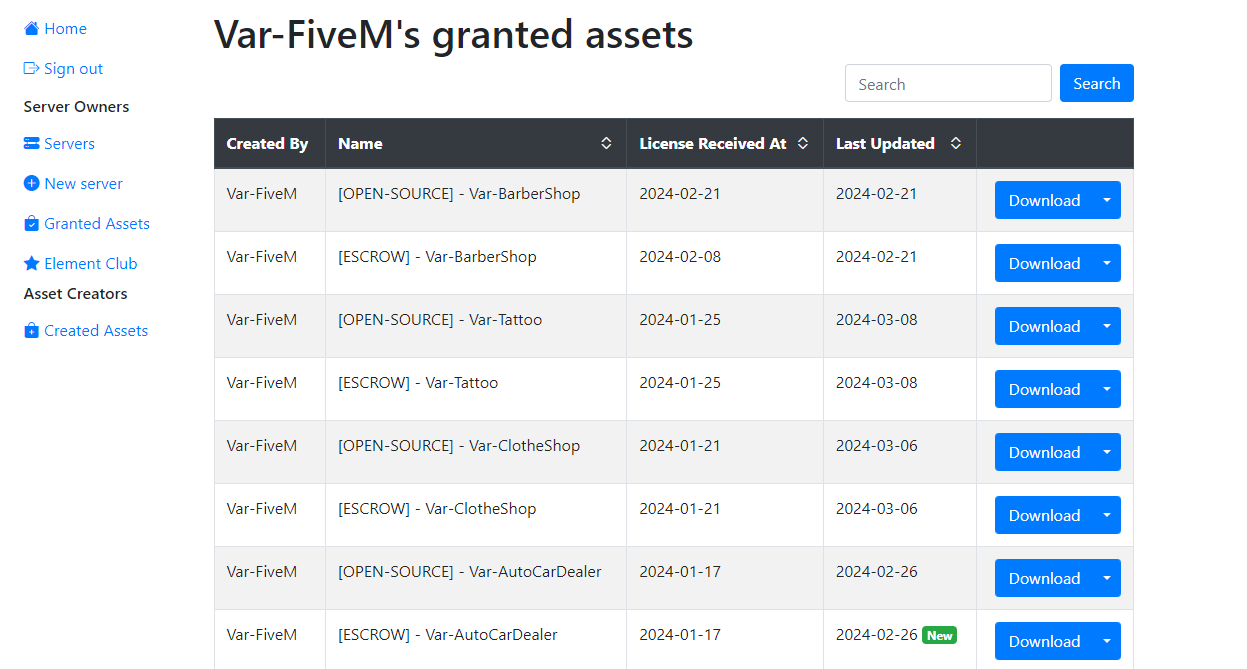
Go to the Granted Assets category and download the most recent version of the Multi Character

3. Edit the scripts to align with the standard core resources

ESX

@esx_multicharacter

  1. Delete esx_multicharacter folder.
  2. Open @es_extended/config.lua and set GetResourceState("Var-MultiChar") ~= "missing" to Config.Multichar
  3. Add SQL
sql
CREATE TABLE `multicharacter_slots` (
	`identifier` VARCHAR(60) NOT NULL,
	`slots` INT(11) NOT NULL,
	PRIMARY KEY (`identifier`) USING BTREE,
	INDEX `slots` (`slots`) USING BTREE
) ENGINE=InnoDB;

ALTER TABLE `users` ADD COLUMN
	`disabled` TINYINT(1) NULL DEFAULT '0';

QB-Core

@qb-multicharacter

  1. Delete qb-multicharacter folder.
  2. Add SQL
sql
CREATE TABLE `multichars_slots` (
    `identifier` VARCHAR(60) NOT NULL,
    `slots` INT(11) NOT NULL,
    PRIMARY KEY (`identifier`) USING BTREE,
    INDEX `slots` (`slots`) USING BTREE
) ENGINE=InnoDB;

ALTER TABLE `players` ADD COLUMN `disabled` TINYINT(1) NULL DEFAULT '0';

5. Launch your resource

Once the download is complete, unzip the file and drag it into the resources folder of your server.

!warning

If you added the resource while your server was already running, remember to do the refresh command and then ensure the resource.

powershell
refresh
code
ensure Var-MultiChar
nextconfiguration

-- on this page

  1. 1. log in to your keymaster account
  2. 2. download resource
  3. 3. edit the scripts to align with the standard core resources
  4. @esx_multicharacter
  5. @qb-multicharacter
  6. 5. launch your resource
VAR
Var FiveM

Skrypty FiveM premium. Niski resmon, wysoka jakość. Stworzone dla ESX, QBCore i Standalone.

28skrypty
1,500+sprzedaze

Skrypty

  • Marketplace
  • Pakiety
  • Subskrypcje
  • Kreator motywu

Najpopularniejsze

  • Supermarket Simulator
  • FiveM Casino Script
  • FiveM Coin Shop
  • FiveM Emote Menu
  • FiveM Paintball Script

Zasoby

  • Free Scripts
  • Guides
  • Dokumentacja
  • Wsparcie

Firma

  • O nas
  • Kontakt
  • Discord

Informacje prawne

  • Regulamin
  • Prywatność
  • Zwroty

© 2026 Var FiveM. Wszystkie sprzedaze sa ostateczne.

Płatności obsługujeTebex